반응형

Patch Id: 29585399 
Patch Description: OCW RELEASE UPDATE 19.3.0.0.0 (29585399)
Patch Apply Time: 2019-04-18T07:21:33Z


Patch Id: 33515361
Patch Description: Database Release Update : 19.14.0.0.220118 (33515361)
Patch Apply Time: 2022-02-07T08:44:16Z


Patch Id: 33561310
Patch Description: OJVM RELEASE UPDATE: 19.14.0.0.220118 (33561310)
Patch Apply Time: 2022-02-07T08:48:36Z

Patch Id: 28730253
Patch Description: SUPPORT NEW ERA REIWA FOR JAPANESE IMPERIAL CALENDAR
Patch Apply Time: 2022-02-07T08:49:29Z

Patch Id: 29213893
Patch Description: DBMS_STATS FAILING WITH ERROR ORA-01422 WHEN GATHERING STATS FOR USER$ TABLE
Patch Apply Time: 2022-02-07T08:50:17Z


Patch Id: 28852325
Patch Description: RDBMS - DSTV33 UPDATE - TZDATA2018G
Patch Apply Time: 2022-02-07T08:50:50Z


Patch Id: 29997937
Patch Description: RDBMS - DSTV34 UPDATE - TZDATA2019B
Patch Apply Time: 2022-02-07T08:51:23Z

Patch Id: 31335037
Patch Description: RDBMS - DSTV35 UPDATE - TZDATA2020A
Patch Apply Time: 2022-02-07T08:51:56Z

Patch Id: 32327201
Patch Description: RDBMS - DSTV36 UPDATE - TZDATA2020E
Patch Apply Time: 2022-02-07T08:52:29Z

Patch Id: 33613829
Patch Description: RDBMS - DSTV37 UPDATE - TZDATA2021E
Patch Apply Time: 2022-02-07T08:53:02Z

Patch Id: 33613833
Patch Description: DSTV37 UPDATE - TZDATA2021E - NEED OJVM FIX
Patch Apply Time: 2022-02-07T08:53:35Z

반응형
반응형

[주의사항]

[참고문서]

Be Cautious When Revoking Privileges Granted to PUBLIC (문서 ID 247093.1)
퍼블릭으로 부여된 권한을 회수할 때 주의할 점 (문서 ID 2119996.1)


[개인의견]

초기설치 후 PUBLIC권한과 설정이 끝난 후 Public 권한을 비교해서 추가된 Public 권한 만 회수 하면 될 같다.

반응형
반응형

[Timezone 변경 방법]

[ec2-user@ip-XXX-XX-XX-XX ~]$
[ec2-user@ip-XXX-XX-XX-XX ~]$ more /etc/sysconfig/clock
ZONE="UTC"
UTC=true
[ec2-user@ip-XXX-XX-XX-XX ~]$
[ec2-user@ip-XXX-XX-XX-XX ~]$ date
Tue May 10 07:04:55 UTC 2022
[ec2-user@ip-XXX-XX-XX-XX ~]$
[ec2-user@ip-XXX-XX-XX-XX ~]$ sudo su - root
[root@ip-XXX-XX-XX-XX ~]#
[root@ip-XXX-XX-XX-XX ~]# rm /etc/localtime
rm: remove regular file ‘/etc/localtime’? y
[root@ip-XXX-XX-XX-XX ~]# ln -s /usr/share/zoneinfo/Asia/Seoul /etc/localtime
[root@ip-XXX-XX-XX-XX ~]#
[root@ip-XXX-XX-XX-XX ~]# more /etc/sysconfig/clock
ZONE="UTC"
UTC=true
[root@ip-XXX-XX-XX-XX ~]#
[root@ip-XXX-XX-XX-XX ~]# date
Tue May 10 16:06:22 KST 2022
[root@ip-XXX-XX-XX-XX ~]#
반응형
반응형

[기존 상태]

[ec2-user@ip-XXX-XX-XX-XX ~]$ uname -a
Linux ip-XXX-XX-XX-XX.us-west-2.compute.internal 5.10.109-104.500.amzn2.x86_64 #1 SMP Wed Apr 13 20:31:43 UTC 2022 x86_64 x86_64 x86_64 GNU/Linux
[ec2-user@ip-XXX-XX-XX-XX ~]$
[ec2-user@ip-XXX-XX-XX-XX ~]$ df -h
Filesystem      Size  Used Avail Use% Mounted on
devtmpfs        474M     0  474M   0% /dev
tmpfs           483M     0  483M   0% /dev/shm
tmpfs           483M  444K  482M   1% /run
tmpfs           483M     0  483M   0% /sys/fs/cgroup
/dev/xvda1      8.0G  1.6G  6.5G  20% /
tmpfs            97M     0   97M   0% /run/user/1000
[ec2-user@ip-XXX-XX-XX-XX ~]$
[ec2-user@ip-XXX-XX-XX-XX ~]$ lsblk
NAME    MAJ:MIN RM SIZE RO TYPE MOUNTPOINT
xvda    202:0    0   8G  0 disk
└─xvda1 202:1    0   8G  0 part /
[ec2-user@ip-XXX-XX-XX-XX ~]$

[ EBS 볼륨 증설]
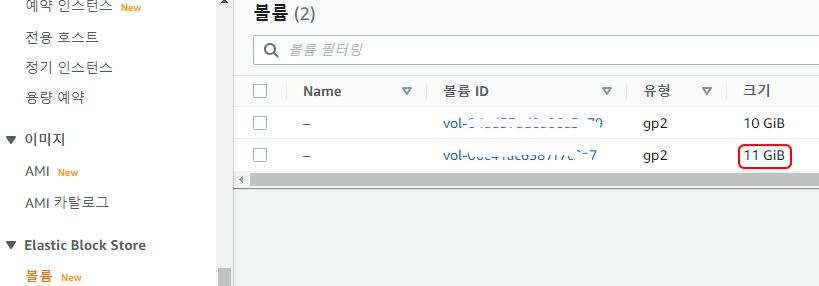
Elastic Block Store > 볼륨 > 원하는 볼륨선택 > 작업 > 볼륨수정

​볼륨수정에서 원하는 값 입력 후 수정 클릭

Elastic Block Store > 볼륨 에서 변경 사항 확인(조금 시간 걸림)


[ROOT Partition Resize]

[ec2-user@ip-XXX-XX-XX-XX ~]$ lsblk
NAME    MAJ:MIN RM SIZE RO TYPE MOUNTPOINT
xvda    202:0    0  11G  0 disk
└─xvda1 202:1    0   8G  0 part /
[ec2-user@ip-XXX-XX-XX-XX ~]$
[ec2-user@ip-XXX-XX-XX-XX ~]$
[ec2-user@ip-XXX-XX-XX-XX ~]$ df -h
Filesystem      Size  Used Avail Use% Mounted on
devtmpfs        474M     0  474M   0% /dev
tmpfs           483M     0  483M   0% /dev/shm
tmpfs           483M  444K  482M   1% /run
tmpfs           483M     0  483M   0% /sys/fs/cgroup
/dev/xvda1      8.0G  1.6G  6.5G  20% /
tmpfs            97M     0   97M   0% /run/user/1000
[ec2-user@ip-XXX-XX-XX-XX ~]$
[ec2-user@ip-XXX-XX-XX-XX ~]$
[ec2-user@ip-XXX-XX-XX-XX ~]$ sudo growpart /dev/xvda 1
CHANGED: partition=1 start=4096 old: size=16773087 end=16777183 new: size=23064543 end=23068639
[ec2-user@ip-XXX-XX-XX-XX ~]$
[ec2-user@ip-XXX-XX-XX-XX ~]$ lsblk
NAME    MAJ:MIN RM SIZE RO TYPE MOUNTPOINT
xvda    202:0    0  11G  0 disk
└─xvda1 202:1    0  11G  0 part /
[ec2-user@ip-XXX-XX-XX-XX ~]$
[ec2-user@ip-XXX-XX-XX-XX ~]$ df -h
Filesystem      Size  Used Avail Use% Mounted on
devtmpfs        474M     0  474M   0% /dev
tmpfs           483M     0  483M   0% /dev/shm
tmpfs           483M  444K  482M   1% /run
tmpfs           483M     0  483M   0% /sys/fs/cgroup
/dev/xvda1      8.0G  1.6G  6.5G  20% /
tmpfs            97M     0   97M   0% /run/user/1000
[ec2-user@ip-XXX-XX-XX-XX ~]$
[ec2-user@ip-XXX-XX-XX-XX ~]$ sudo xfs_growfs -d /
meta-data=/dev/xvda1             isize=512    agcount=4, agsize=524159 blks
         =                       sectsz=512   attr=2, projid32bit=1
         =                       crc=1        finobt=1 spinodes=0
data     =                       bsize=4096   blocks=2096635, imaxpct=25
         =                       sunit=0      swidth=0 blks
naming   =version 2              bsize=4096   ascii-ci=0 ftype=1
log      =internal               bsize=4096   blocks=2560, version=2
         =                       sectsz=512   sunit=0 blks, lazy-count=1
realtime =none                   extsz=4096   blocks=0, rtextents=0
data blocks changed from 2096635 to 2883067
[ec2-user@ip-XXX-XX-XX-XX ~]$
[ec2-user@ip-XXX-XX-XX-XX ~]$ df -h
Filesystem      Size  Used Avail Use% Mounted on
devtmpfs        474M     0  474M   0% /dev
tmpfs           483M     0  483M   0% /dev/shm
tmpfs           483M  444K  482M   1% /run
tmpfs           483M     0  483M   0% /sys/fs/cgroup
/dev/xvda1       11G  1.6G  9.5G  15% /
tmpfs            97M     0   97M   0% /run/user/1000
[ec2-user@ip-XXX-XX-XX-XX ~]$
[ec2-user@ip-XXX-XX-XX-XX ~]$ lsblk
NAME    MAJ:MIN RM SIZE RO TYPE MOUNTPOINT
xvda    202:0    0  11G  0 disk
└─xvda1 202:1    0  11G  0 part /
[ec2-user@ip-XXX-XX-XX-XX ~]$
[ec2-user@ip-XXX-XX-XX-XX ~]$


[참고자료]
https://customer.gabia.com/manual/cloud/8521/9740

반응형
반응형

[증 상]

Oracle CRS 19c를 중지 하는 경우 

"A system call received a parameter that is not valid. (Write failed)"

메시지 출력 되면


[현 상]

[rac1:P:root:/u01/grid/bin] # id
uid=0(root) gid=0(system) groups=2(bin),3(sys),7(security),8(cron),10(audit),11(lp)
[rac1:P:root:/u01/grid/bin] # pwd
/u01/grid/bin
[rac1:P:root:/u01/grid/bin] #
[rac1:P:root:/u01/grid/bin] # ./crsctl stop crs
CRS-2791: Starting shutdown of Oracle High Availability Services-managed resources on 'rac1'
CRS-2673: Attempting to stop 'ora.crsd' on 'rac1'
CRS-2790: Starting shutdown of Cluster Ready Services-managed resources on server 'rac1'
CRS-2673: Attempting to stop 'ora.rac2.vip' on 'rac1'
CRS-2673: Attempting to stop 'ora.LISTENER_SCAN1.lsnr' on 'rac1'
CRS-2673: Attempting to stop 'ora.cvu' on 'rac1'
CRS-2673: Attempting to stop 'ora.LI_DBBREP1.lsnr' on 'rac1'
CRS-2673: Attempting to stop 'ora.LI_DBAREP1.lsnr' on 'rac1'
CRS-33673: Attempting to stop resource group 'ora.asmgroup' on server 'rac1'
CRS-2673: Attempting to stop 'ora.OCRVOTE.dg' on 'rac1'
CRS-2673: Attempting to stop 'ora.DBAARCH.dg' on 'rac1'
CRS-2673: Attempting to stop 'ora.DBADATA.dg' on 'rac1'
CRS-2673: Attempting to stop 'ora.DBBARCH.dg' on 'rac1'
CRS-2673: Attempting to stop 'ora.DBBDATA.dg' on 'rac1'
CRS-2673: Attempting to stop 'ora.qosmserver' on 'rac1'
CRS-2677: Stop of 'ora.rac2.vip' on 'rac1' succeeded
CRS-2677: Stop of 'ora.cvu' on 'rac1' succeeded
CRS-2677: Stop of 'ora.DBAARCH.dg' on 'rac1' succeeded
CRS-2677: Stop of 'ora.DBADATA.dg' on 'rac1' succeeded
CRS-2677: Stop of 'ora.LI_DBBREP1.lsnr' on 'rac1' succeeded
CRS-2677: Stop of 'ora.LISTENER_SCAN1.lsnr' on 'rac1' succeeded
CRS-2673: Attempting to stop 'ora.scan1.vip' on 'rac1'
CRS-2677: Stop of 'ora.DBBDATA.dg' on 'rac1' succeeded
CRS-2677: Stop of 'ora.OCRVOTE.dg' on 'rac1' succeeded
CRS-2677: Stop of 'ora.DBBARCH.dg' on 'rac1' succeeded
CRS-2673: Attempting to stop 'ora.asm' on 'rac1'
CRS-2677: Stop of 'ora.LI_DBAREP1.lsnr' on 'rac1' succeeded
CRS-2673: Attempting to stop 'ora.rac1.vip' on 'rac1'
CRS-2677: Stop of 'ora.scan1.vip' on 'rac1' succeeded
CRS-2677: Stop of 'ora.rac1.vip' on 'rac1' succeeded
CRS-2677: Stop of 'ora.asm' on 'rac1' succeeded
CRS-2673: Attempting to stop 'ora.ASMNET1LSNR_ASM.lsnr' on 'rac1'
A system call received a parameter that is not valid. (Write failed)
CRS-2677: Stop of 'ora.qosmserver' on 'rac1' succeeded
CRS-2677: Stop of 'ora.ASMNET1LSNR_ASM.lsnr' on 'rac1' succeeded
CRS-2673: Attempting to stop 'ora.asmnet1.asmnetwork' on 'rac1'
CRS-2677: Stop of 'ora.asmnet1.asmnetwork' on 'rac1' succeeded
CRS-33677: Stop of resource group 'ora.asmgroup' on server 'rac1' succeeded.
CRS-2673: Attempting to stop 'ora.ons' on 'rac1'
CRS-2677: Stop of 'ora.ons' on 'rac1' succeeded
CRS-2673: Attempting to stop 'ora.net1.network' on 'rac1'
CRS-2677: Stop of 'ora.net1.network' on 'rac1' succeeded
CRS-2792: Shutdown of Cluster Ready Services-managed resources on 'rac1' has completed
CRS-2677: Stop of 'ora.crsd' on 'rac1' succeeded
CRS-2673: Attempting to stop 'ora.storage' on 'rac1'
CRS-2673: Attempting to stop 'ora.crf' on 'rac1'
CRS-2673: Attempting to stop 'ora.drivers.acfs' on 'rac1'
CRS-2673: Attempting to stop 'ora.mdnsd' on 'rac1'
CRS-2677: Stop of 'ora.crf' on 'rac1' succeeded
CRS-2677: Stop of 'ora.storage' on 'rac1' succeeded
CRS-2673: Attempting to stop 'ora.asm' on 'rac1'
CRS-2677: Stop of 'ora.drivers.acfs' on 'rac1' succeeded
CRS-2677: Stop of 'ora.mdnsd' on 'rac1' succeeded
CRS-2677: Stop of 'ora.asm' on 'rac1' succeeded
CRS-2673: Attempting to stop 'ora.cluster_interconnect.haip' on 'rac1'
CRS-2677: Stop of 'ora.cluster_interconnect.haip' on 'rac1' succeeded
CRS-2673: Attempting to stop 'ora.ctssd' on 'rac1'
CRS-2673: Attempting to stop 'ora.evmd' on 'rac1'
CRS-2677: Stop of 'ora.ctssd' on 'rac1' succeeded
CRS-2677: Stop of 'ora.evmd' on 'rac1' succeeded
CRS-2673: Attempting to stop 'ora.cssd' on 'rac1'
CRS-2677: Stop of 'ora.cssd' on 'rac1' succeeded
CRS-2673: Attempting to stop 'ora.gipcd' on 'rac1'
CRS-2673: Attempting to stop 'ora.gpnpd' on 'rac1'
CRS-2677: Stop of 'ora.gpnpd' on 'rac1' succeeded
CRS-2677: Stop of 'ora.gipcd' on 'rac1' succeeded
CRS-2793: Shutdown of Oracle High Availability Services-managed resources on 'rac1' has completed
CRS-4133: Oracle High Availability Services has been stopped.
[rac1:P:root:/u01/grid/bin] #

[해결책]

무시하면 됨

[참고문서]

"a System Call Received A Parameter That Is Not Valid.(write Falied)" When Stop Crs (문서 ID 2706112.1)

반응형

+ Recent posts